
Legacy application modernization services for the system you can't switch off
We document what your old system really does, agree which parts to keep, clean up, move, or replace, then change them one at a time while your team keeps using it.
Engagement commitments
- We map the system before we change it
- An agreed way to undo every release
- You own the code, docs, and accounts
A plain-English health check
What your system does, where the risks are, and what we recommend for each part.
- Today
- What it does, and what it depends on
- Risks
- The biggest risks, ranked by impact
- Each part
- Keep, clean up, move, or replace
- Order
- What to do first, and what to leave alone
Accelerated by
 Lovable
 Cursor
 Replit
 Copilot
 Kiro
Kiro Antigravity

 Figma MakeLovableCursorReplitCopilotKiroAntigravityFigma Make
When legacy application modernization makes sense
The system still runs your business, but every change takes weeks, the person who built it has moved on, and your team works around it more than with it. That's the point where modernizing pays off. Not sure yours is there yet? Ask us, and we'll give you a straight answer.
This is probably you if
- 01The system still runs your business, but every change takes weeks and your team avoids changing it.
- 02The person who built it has left, and what it really does is known only to a few people.
- 03It runs on outdated or unsupported technology, and the hosting or license costs keep rising.
When we'd tell you not to
- You want something new built from scratch. That's a different project, and our custom software development page covers it.
- You want a website or visual redesign, or a code review with no plan to act on it.
- You need a promise of zero risk, zero downtime, or no data loss. No one can honestly give you that.
Keep it, clean it up, move it, or replace it
Every part of the system gets its own decision.
Clean it up
(also called refactor)02It works, but the code is hard to follow, so every change is slow and risky.
What we do
We write tests that capture what it does today, then restructure the code so it behaves the same and is safe to change.
You end up with
Same behavior, safe to change
What you take on
Same system, less risk
How we decide
We don't pick one approach for the whole system. We go part by part: what still works, what's risky to change, what runs on unsupported technology, and what no one can safely change anymore. Then we work in the order that reduces the most risk first.
What we watch for
- Undocumented business rules. We walk through the system with the people who use it, then write tests that capture that behavior.
- Hidden connections. We map what depends on what before we change anything.
- Your data. Backups, a practice run, and checks that the numbers match before and after.
- Availability. One part at a time, a planned maintenance window when one is needed, and an agreed way to undo any release. We don't promise zero downtime.
- Security and compliance. We help you work out what's required and work alongside your own specialists. We don't certify or sign off compliance ourselves.
The risk isn't the old code. It's what nobody wrote down.
So we make sure the system is understood before we change it.
Most older systems contain rules nobody documented: the discount that applies to one customer, the report finance relies on every month, the overnight job that corrects bad data. None of that is in a spec, and some of it isn't obvious from the code either.
So we first document what it really does, with the people who use it. Then we decide part by part what to keep, clean up, move, or replace, and change one part at a time so your business keeps running while we work.
- We map it before we change it
- One part at a time
- A plan to undo every release
Six deliverables you can review, question, and keep
So your system no longer lives only in a few people's heads. Which ones apply depends on the project, and your quote lists exactly which you'll get.
A health check and a candid risk list
1 of 6 · you review this before we change anything
11 findings, ranked by risk
What you get
A health check and a candid risk list
What the system does today, what it depends on, who owns each part, and the issues most likely to cause problems.
If you only buy the health check, you get the first three, and they're yours to keep. The rest come with the modernization work itself.
What legacy application modernization involves
What your system needs depends on its size and age. Most small-business systems need three or four of these, not all six, and the plan says which.
- 01
Health check and risk list
What the system does today, what it depends on, and where the biggest risks are
- 02
System map
The work it handles, the business rules inside it, and what depends on what
- 03
Part-by-part plan
Keep, clean up, move, or replace each part, and the order we'd do it in
- 04
Data migration
What moves where, a practice run first, and checks that the numbers still match
- 05
Tests that capture today's behavior
So we can show the new version does what the old one did
- 06
Launch and handover
A planned window, a way to undo the release, documentation, and account access for your team
Four checkpoints, from first review to your team running it
We don't move to the next stage until the decision is written down, along with who made it and what we're leaving alone.
- 01
Find out what it really does
We walk through the system with the people who use it, document the rules and the exceptions, and list what could go wrong.
Current behavior documented and agreed - 02
Agree what happens to each part
You get it in writing: keep, clean up, move, or replace, part by part, with the order of work and what's out of scope.
A written decision for each part - 03
Change one part at a time
We write tests that capture today's behavior first, then change one part. A senior engineer reviews the code, and you check it before we move on.
Tests pass, and you've checked it - 04
Launch and hand over
We launch in a planned window if one is needed, with a way to undo the release, then hand the code, documentation, and accounts to your team.
Live, and your team can run it
Why this saves money
Why one part at a time beats a big rewrite
- We document what the system does before we change anything
- Each part gets its own decision, so you don't pay to rebuild what still works
- Tests show the new version behaves like the old one
- Every release has an agreed undo plan, and the documentation goes with the code
At every checkpoint you know what was decided, who decided it, and what we're leaving alone.
Read the SLO case studyWhat changed on the SLO platform
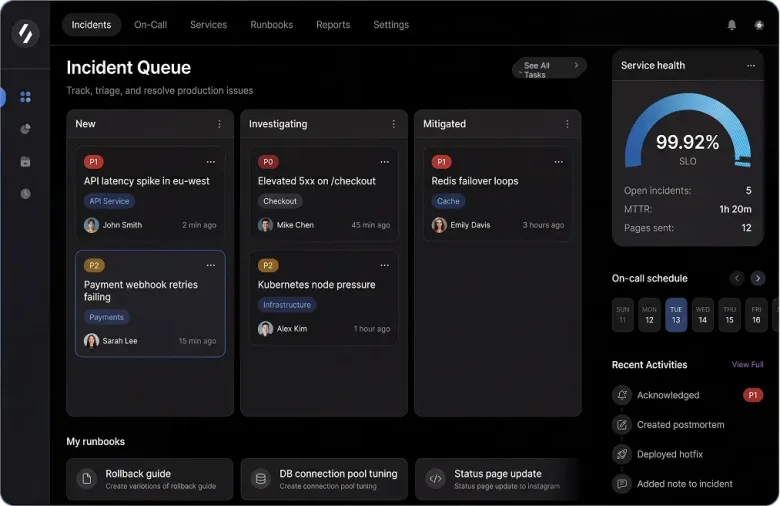
Results from one six-month project on an 8-year-old codebase. Every system is different, so treat these as an example, not a promise.
- What it does today, checked with your team
- Documented first
- With an agreed way to undo every release
- One part at a time
- Code, documentation, and accounts handed over
- You own it

What legacy application modernization costs, and how we quote it
No one can price an older system accurately without looking at it first. So we review it, then quote each stage, and the quote says what's in, what's out, and what would change the price.
Modernize one area
We take on an agreed set of parts, clean up, move, or replace them, and launch them carefully.
Tell us about the jobWhat's included
- The parts we agreed on
- Data migration, tests, and a planned launch
- Documentation and accounts handed over
What changes the price?
How big it is, and whether it's tested
Its size, whether the technology it runs on is still supported, and whether any tests exist. Without tests, we write them first so we can change things safely.
What it connects to
Payment providers, accounting, suppliers, older databases. Some are straightforward. Older or undocumented ones can double the work, and we'll tell you early if yours is one of them.
How much data has to move, and how clean it is
How much there is, what shape it's in, and how exactly the numbers need to match afterward. Messy data is usually what takes longest.
How much downtime you can accept
A system people use all day needs more testing, a carefully planned window, and a clearer undo plan than one used once a month.
Your quote spells out what's included, what isn't, who reviews each stage, and what would change the price. We don't promise zero downtime, but we agree in writing how we'd undo a release.
Businesses running on a system that works, but is hard to change
Most of our legacy application modernization work is for small and mid-sized businesses. It works best when we can talk to both the person who makes decisions and the people who use the system every day.
Owners and directors
The system still runs your business, and it needs to keep doing that while it's modernized.
In-house tech teams
You know what needs doing. You need senior engineers and a safe order to do it in.
Operations and support teams
You handle the breakages and workarounds, and you want them documented and fixed.
Whoever inherited it
The person who built it has left, and you want to understand it before you change it.
Keep the system your team already knows.Fix the parts that slow you down.
We document what it does, decide part by part, change one thing at a time, and hand over the documentation with the code. Tell us about your system, and we'll reply within one business day.
- What it does today, documented
- We review first
- An agreed way to undo every release
- One part at a time
- Code, documentation, and accounts handed over
- You keep it
Legacy application modernization: your questions
What is legacy application modernization?
Legacy application modernization means updating or replacing an older system your business still depends on, while people keep using it. In practice it's a mix of four approaches: keeping the parts that still work, cleaning up the parts that are risky to change, moving parts onto current technology, and rebuilding only the parts no one can safely change anymore. It also covers the less visible work: documenting what the system really does, migrating data safely, testing, launching, and handing the code over to you.
Should we fix our old system or replace it?
Usually a bit of both, part by part. A full replacement sounds cleaner, but it's the most expensive and riskiest option, and it tends to lose business rules that took years to get right. So we look at each part on its own. The industry calls the four options retain, refactor, replatform, and rebuild. In plain terms: keep it if it still works, clean it up if it's sound but risky to change, move it if the problem is the technology it runs on, and rebuild only where no one can safely change it. You get that decision in writing before any work starts.
Can you modernize it without shutting the business down?
That's why we work one part at a time. We write tests that capture what the system does today, change one part, and let you check it before we move on. Where it makes sense, we run the new part alongside the old one until their results match. We won't promise zero downtime, because no one can honestly guarantee that, but we agree in writing when a maintenance window is needed and exactly how we'd undo a release.
What happens to the rules nobody wrote down?
That's usually the biggest risk in an older system, so it's where we start. We walk through it with the people who use it, document what it really does, and write tests that capture that behavior so we can show the new version matches. We're clear about the limit: we can only verify the behavior we agreed to test, so we can't claim to preserve every undocumented quirk in a system no one has documented.
How much does modernizing a legacy system cost?
No one can quote an older system accurately without looking at it. The same work can take three weeks or three months depending on its size, whether tests exist, what it connects to, and how much data has to move. So we start with a health check, then quote each stage at a fixed price. The quote says what's included, what isn't, and what would change the price. The first call is free, and we'll tell you honestly if modernizing isn't worth it yet.
Who owns it afterwards, and do you stick around?
You own it. You get the repository, the accounts, instructions for running it, the decisions we made and why, and a clear list of what we didn't change. After that, you can keep us on for the next stage or for support, or your own team can take it from there. Support is quoted separately, never assumed.

Tell us about your project
Tell us what you're building, when you need it, and what's in the way. A senior engineer will reply within one business day with honest next steps, even if that means we're not the right fit.
- Your project is led by a senior engineer, not a junior and not AI on its own
- AI speeds up the build. Every change is reviewed and tested before it ships
- Best for MVPs, SaaS products, automation, and fixing apps that keep breaking